Best Fundraising Thermometer Software for Nonprofits and Gala Events
What a live fundraising thermometer is, how it works at a gala or telethon, how to set its goal, and what to look for in donation thermometer software.
· 6 min read
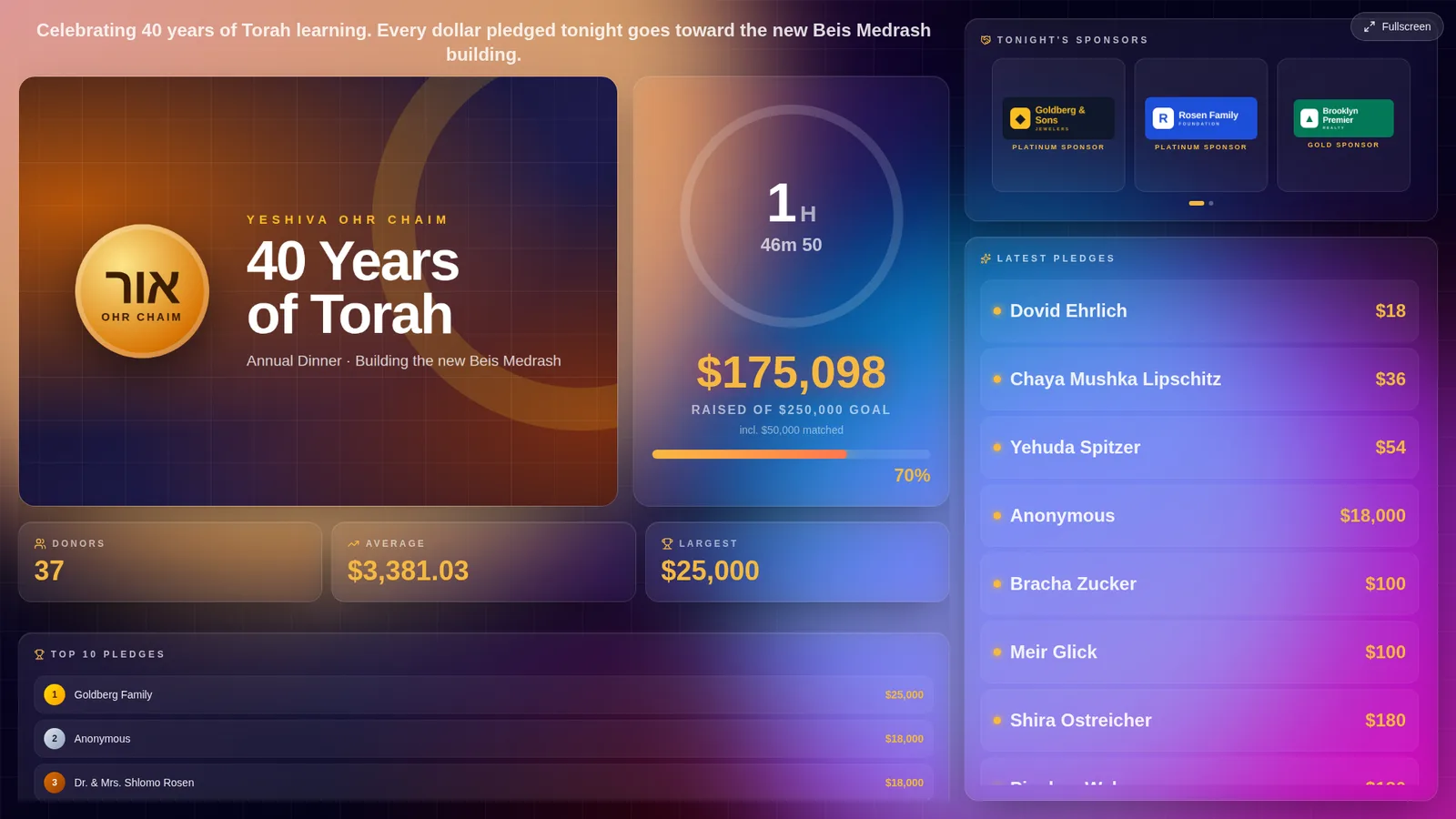
Why Every Fundraising Event Needs a Live Donation Thermometer
A fundraising thermometer is one of the most powerful tools for nonprofit campaigns. By showing progress toward a fundraising goal in real time, organizations can increase urgency and motivate donors to participate.
The paper version taped to a church hall wall has been around for a century, and it works for the same reason the digital one does: people give more readily to something they can see moving. What has changed is the speed. A live fundraising thermometer on a projector moves the second a pledge is approved, so the room watches its own generosity add up instead of hearing about it at the end of the night.
What Is a Donation Thermometer?
A donation thermometer is a visual fundraising tracker that updates live as new pledges arrive. Most modern fundraising thermometer software also includes:
- Live donor walls
- Donation tickers
- Goal tracking
- Campaign analytics
- Real-time pledge updates
How a Live Fundraising Thermometer Works on the Night
The setup is simpler than most organizers expect. One laptop connected to the projector or TV opens the display link and goes fullscreen; that screen is the thermometer the room sees. Everything else happens on phones and laptops around the hall.
Pledges reach the thermometer in two ways. Your team enters them as they are called out — from the stage, at the tables, on the phones during a telethon. And guests pledge themselves by scanning a QR code on the table card or the slide, which opens a short pledge form on their own phone. Either way, an organizer can approve each pledge before it shows, so nothing unexpected ever reaches the big screen.
When a pledge is approved, the total climbs, the bar fills, and the donor's name — or "Anonymous", if they asked — appears on the screen. A good system plays a short celebration for larger gifts and a bigger one when the goal is passed, so the room hears about the milestone the moment it happens.
Benefits of Real-Time Fundraising Goal Tracking
Using a fundraising goal tracker can:
- Increase donor excitement
- Encourage larger pledges
- Create social momentum
- Improve event engagement
- Help campaigns reach goals faster
How to Set the Goal on Your Fundraising Thermometer
The number at the top of the thermometer does more work than any other figure in the room, so it is worth setting deliberately. Set it too low and the bar fills before dessert, and the second half of the night has nothing to chase. Set it so high that the bar barely moves and the thermometer quietly tells everyone the event is falling short.
A practical rule: start from what the same event raised last year, then set the goal ten to twenty percent above it — high enough to ask the room for more, close enough that people believe it can be reached. Keep your own realistic expectation separately. That private number is the one you plan the budget around; the goal on the screen is the one you ask the room to beat.
Two more tools help. A bonus goal gives the bar somewhere to go once the main goal is passed, so momentum is not lost when you cross the line. And a matching gift — a sponsor who doubles every pledge up to a cap — makes the thermometer climb twice as fast, which is the most persuasive thing a screen can show.
Fundraising Thermometer, Donor Wall or Ticker?
These names get used interchangeably, but they do different jobs. A fundraising thermometer shows progress toward a goal: one number, one bar, and the distance still to go. A donor wall shows who gave, usually the largest gifts or the most recent ones, which recognizes donors and gives others a reason to join them. A ticker scrolls each new pledge across the screen as it arrives, which keeps the screen moving between bigger moments.
At a live event you want all three on one screen, not three separate tools. The thermometer answers "how are we doing", the wall answers "who is giving", and the ticker answers "what just happened". Read more about how to display donations live on screen and why live donation walls increase donations.
Where Fundraising Thermometers Are Used
Organizations commonly use live fundraising displays during:
- Charity galas
- School fundraising campaigns
- Synagogue dinners
- Yeshiva campaigns
- Matching gift events
- Livestream fundraisers
Features to Look for in Donation Display Software
The best donation display software should offer:
- Real-time updates
- Mobile donations
- QR code fundraising
- Big-screen display mode
- Donor celebration animations
- OBS streaming overlays
- Team fundraising leaderboards
Fundraising Displays for Modern Events
Today's donors expect interactive experiences. A modern fundraising event software platform can include:
- Live pledge walls
- Animated donor feeds
- Celebration graphics
- Event countdowns
- Goal milestone effects
Fundraising Thermometer FAQ
Do I need special hardware? No. Any laptop and any projector or smart TV will do. The thermometer is a web page; open it in a browser and press fullscreen.
Can the fundraising thermometer appear on our website too? Yes, if the software lets you embed it. The same live display can sit on a campaign page so supporters at home watch the bar fill with the room.
What happens if the internet drops during the event? A well-built display keeps showing the last total and catches up the moment the connection returns, without anyone pressing refresh. Pledges entered meanwhile are not lost.
Should the thermometer show pledges or money received? At a live event, pledges. The point is momentum in the room; payments are collected afterwards and reconciled separately.
Can donors stay anonymous? They should be able to. A donor who ticks "anonymous" still moves the thermometer, but their name never appears on the screen.
Final Thoughts
Whether you're organizing a nonprofit gala or a community fundraiser, a professional fundraising thermometer display can help increase donations and create a more exciting event experience. To see one fill up, try the live fundraising thermometer demo — no account needed.