
Every feature,
shown on the real product.
Nothing here is a mock-up. These are the actual screens your team, your donors and your room will see on event night: the projector display, the organizer's approval dashboard, the pledge link guests open on their phones, and the settings behind scheduled reveals, sponsors, celebration effects and the countdown.
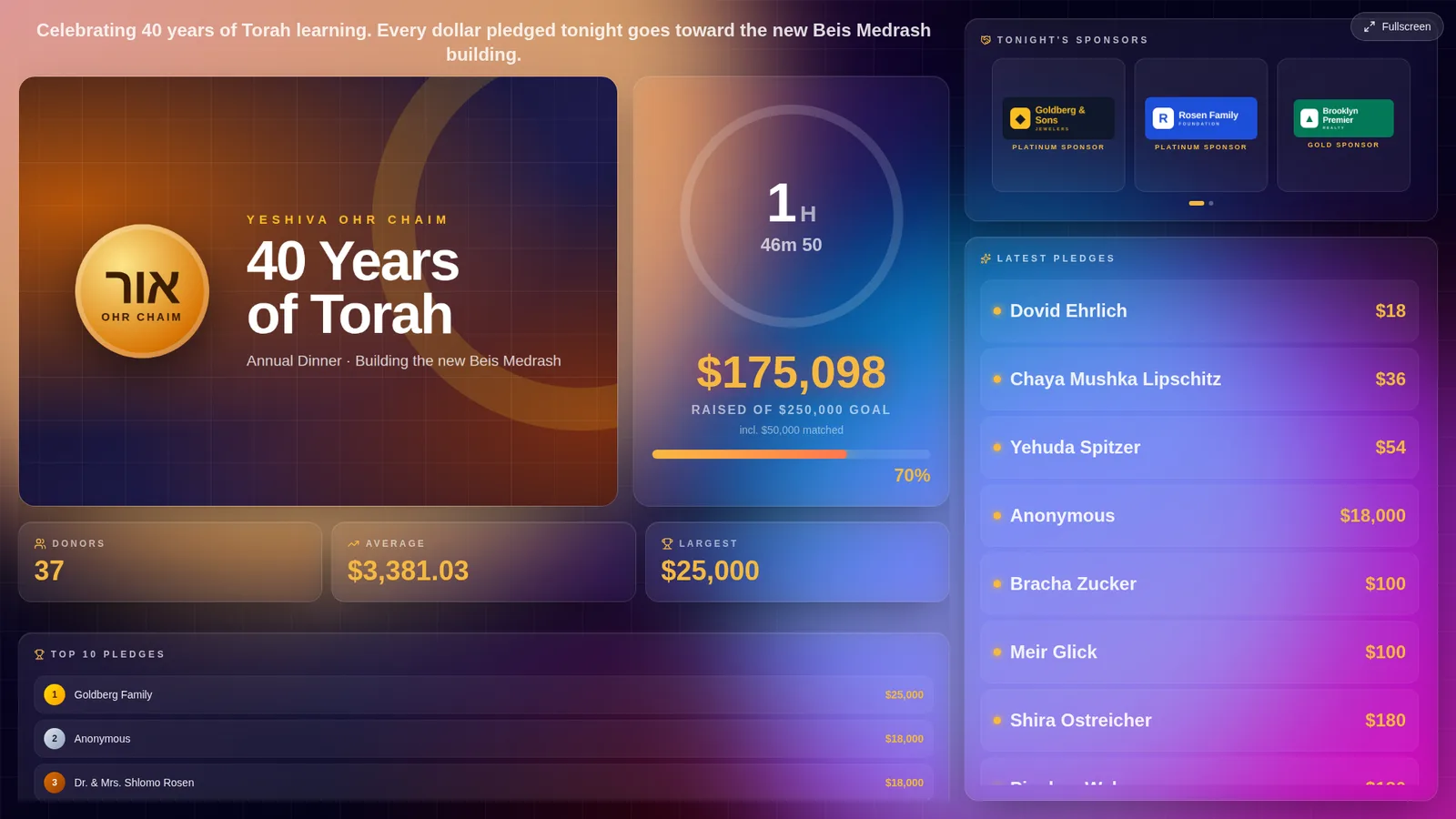
The public live display at 1920×1080, exactly as it renders on a projector or TV.
A fundraising thermometer built for a 20-foot screen.
Open one link on the laptop that feeds the projector, press Fullscreen, and the room watches the total climb in real time. Every pledge you record or approve appears within a second — no refresh, no operator.
- Campaign-banner header: your wide artwork on the left and a stats card beside it with a countdown ring, the glowing total raised, the goal, matched funds and an animated fundraising thermometer bar. Or pick the compact header with the logo beside the total.
- Stat tiles for donors, average pledge and largest pledge, all recomputed live.
- Top 10 pledges leaderboard with gold, silver and bronze rank badges.
- A latest-pledges rail down the right third of the screen, sized to be readable from the back of the hall.
- Sponsor slots, the countdown and your tagline sit right in the layout — nothing to arrange by hand.
- Your event logo, accent colour and background colour or gradient, with an animated aurora background out of the box.
- One-click fullscreen; works in any modern browser on a laptop, Chromecast-style stick or smart TV.
Every pledge gets a moment. Big ones get fireworks.
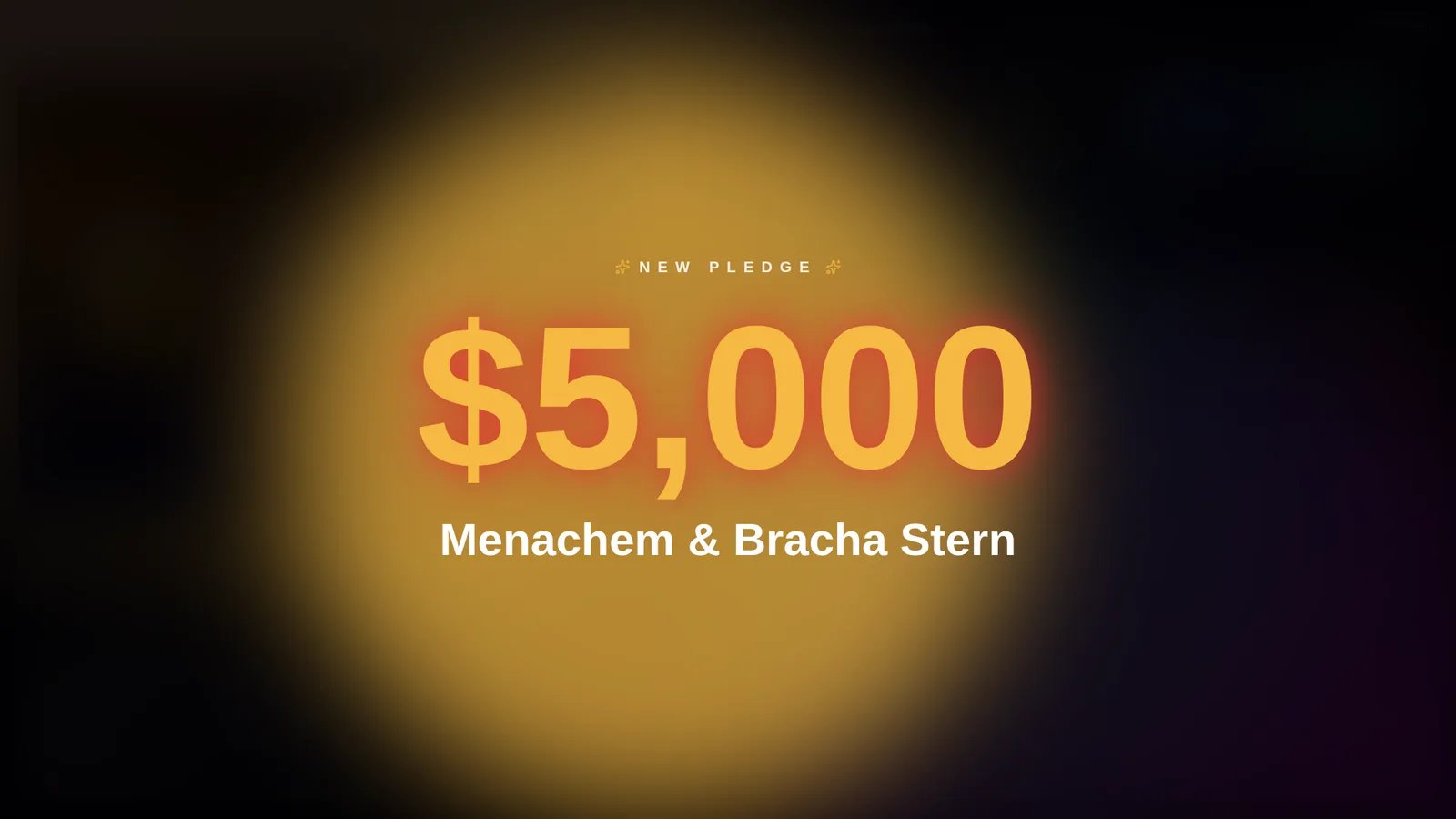
When a pledge lands, the live screen takes over with the amount and the donor's name in huge type, then returns to the board. The effect that plays is chosen by amount, so an $18 pledge pops and a $5,000 pledge lights up the room.
- Full-screen takeover with the amount, the name (or “Anonymous”) and a queue indicator when several pledges arrive at once.
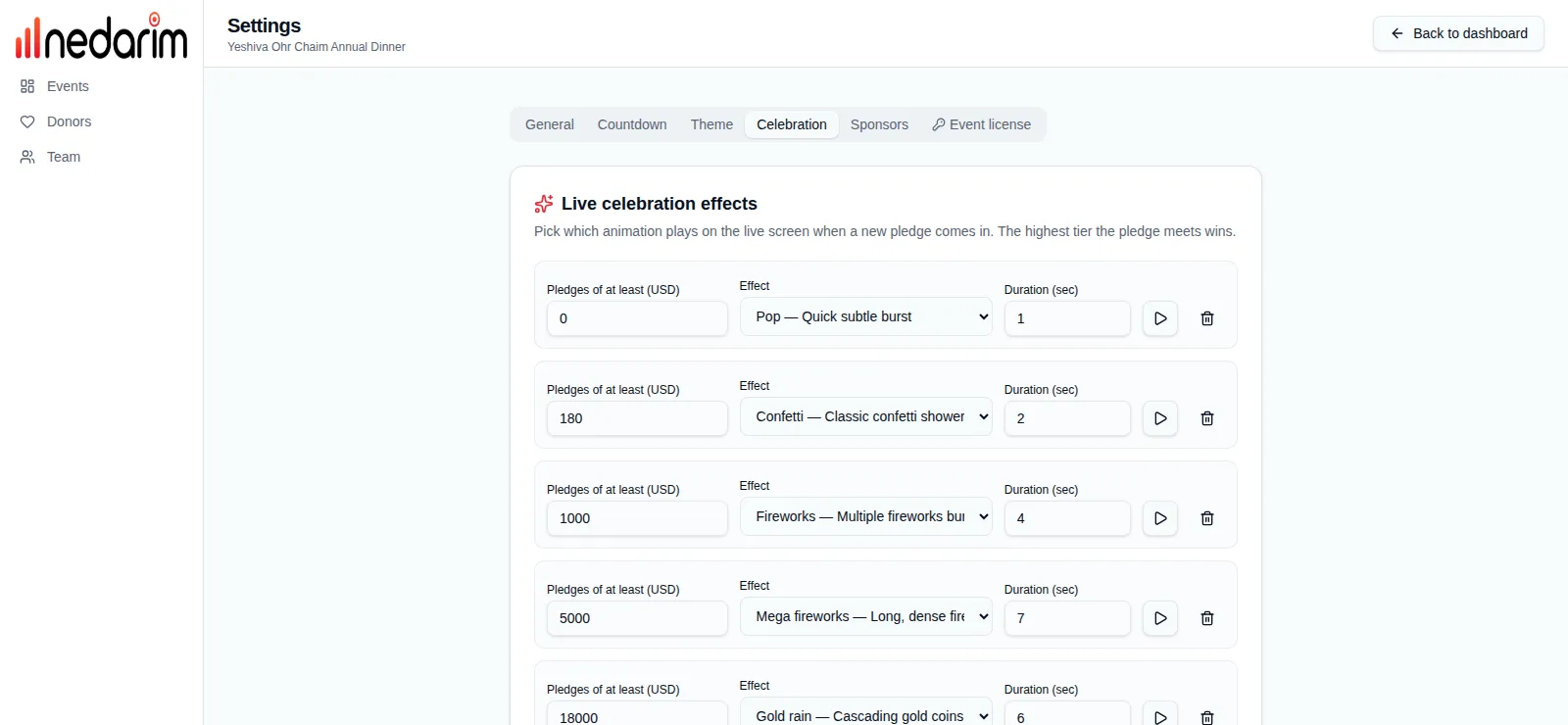
- Amount tiers you define: “pledges of at least X play effect Y for Z seconds”. Add as many rungs as you like — the highest tier the pledge meets wins.
- 28 effects to pick from: Pop, Confetti, Star fountains, Sparkle halo, Ribbon rain, Fireworks, Mega fireworks, Gold coin pile and more.
- A preview button next to each tier plays the effect right in your browser while you configure it.
- Durations are per tier, so a headline gift can hold the screen for longer than a small one.
One screen to run the whole night.
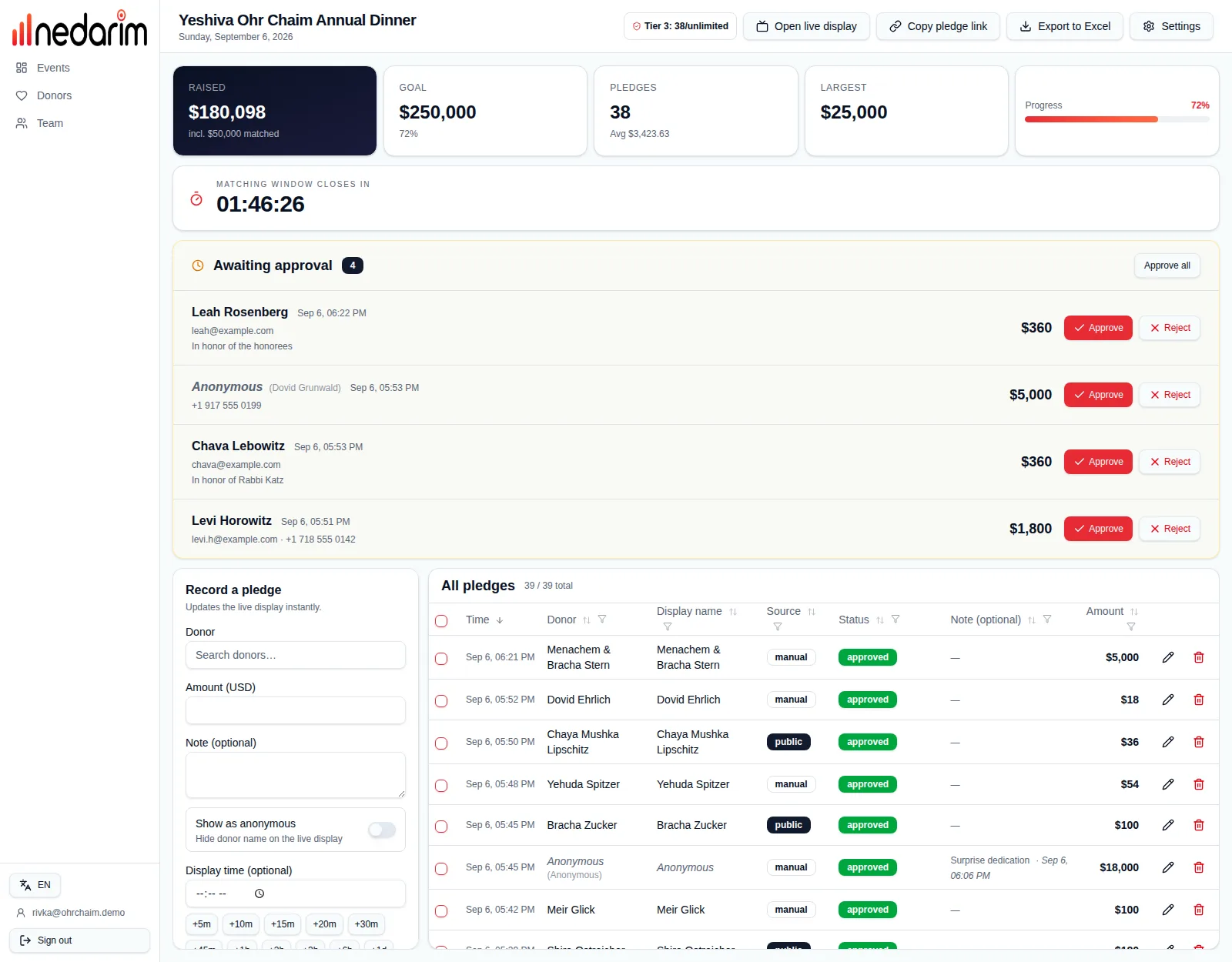
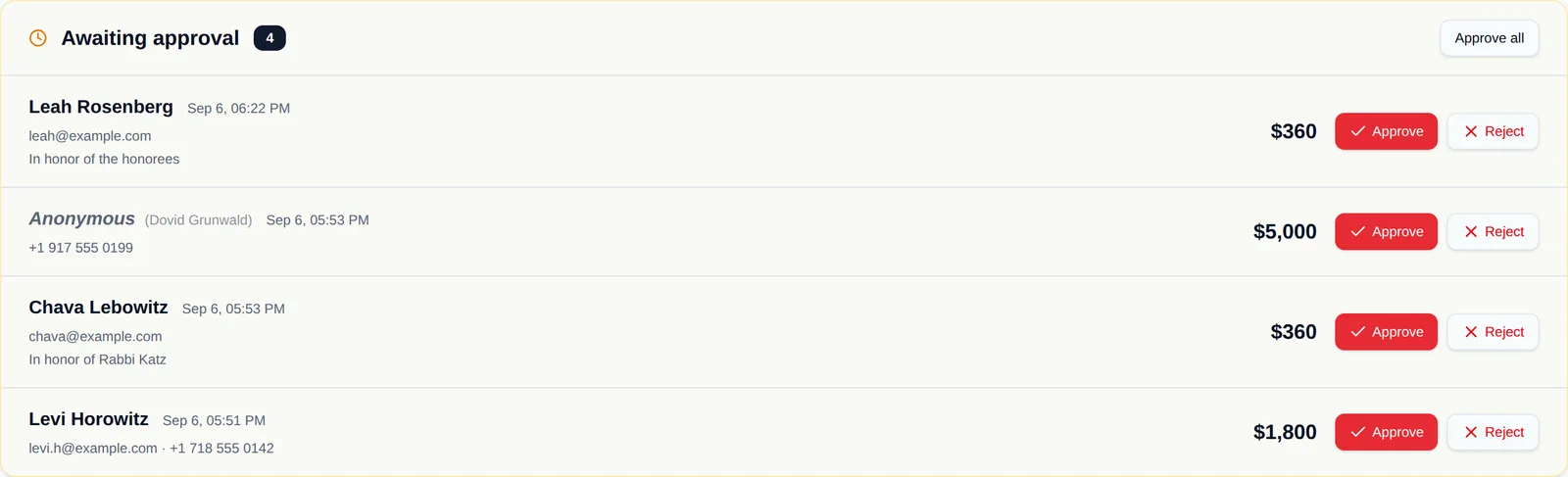
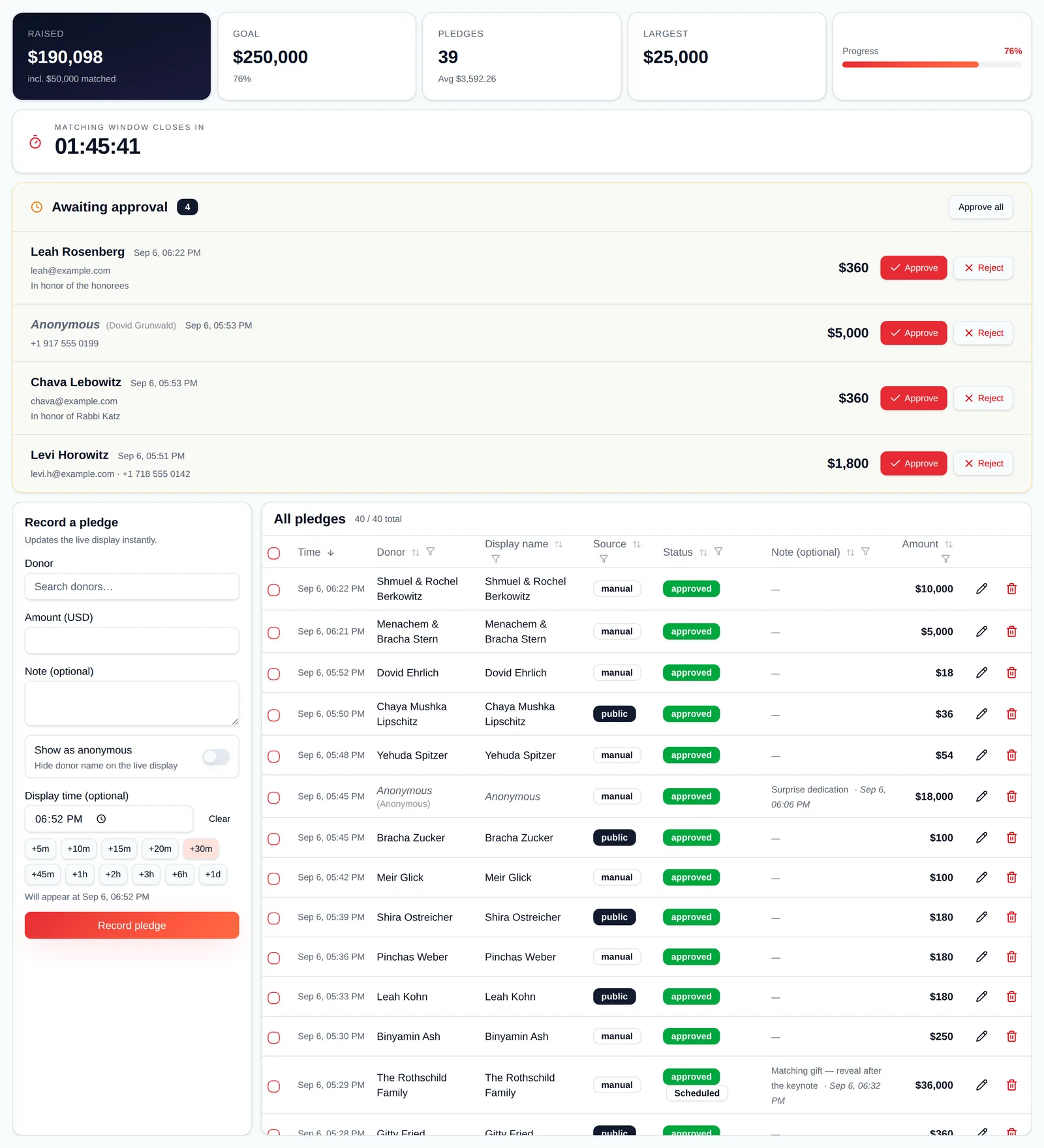
The event page is where your staff work: totals at the top, the countdown, pledges waiting for approval, a fast entry form, and the full pledge list — all updating live as the room gives.
- Raised, goal, pledge count, average, largest and progress at a glance, with the license tier and pledge allowance in the header.
- Approval queue: pledges submitted through the public link arrive as “awaiting approval” with the amount, note, email and phone — approve or reject one at a time, or approve all in one click. A toast tells you when a new one comes in.
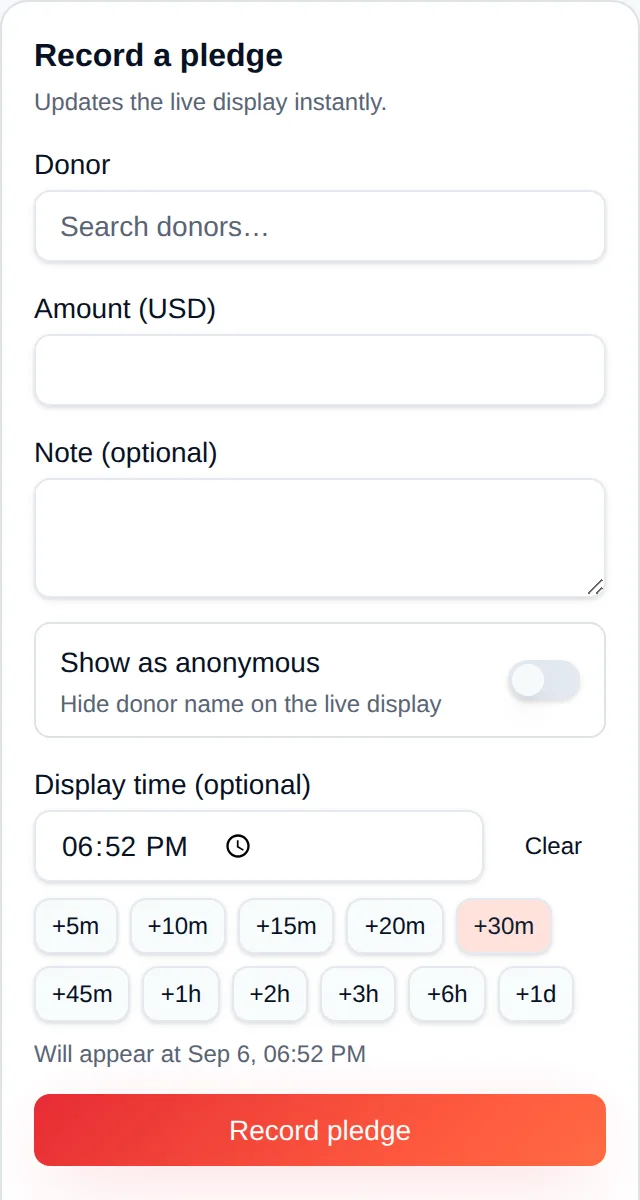
- Record a pledge in seconds: type a donor name to search your directory or create a new donor on the fly, enter the amount and an optional note, and mark it anonymous if asked.
- Full pledge table with sorting, per-column filters, inline editing of names, display names, amounts and notes, and single or bulk delete.
- Buttons for the live display, copying the pledge link, exporting to Excel and opening settings — no hunting through menus mid-event.
- Invite staff to enter pledges; only organization admins can approve, edit or change settings.
Guests pledge from their seats.
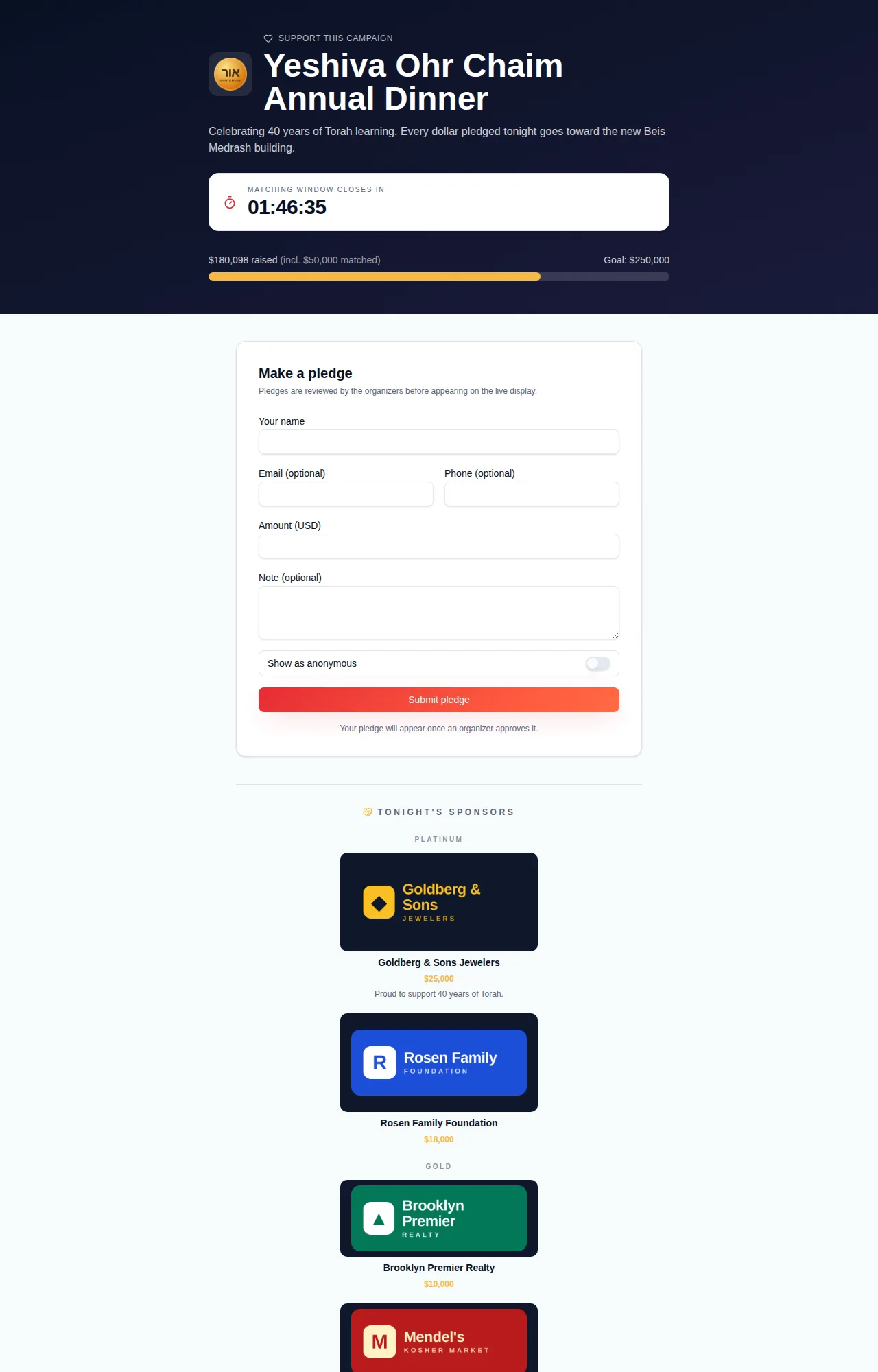
Every event gets a public page at nedarim.com/pledge/your-event. Put it on a QR code, in a WhatsApp group or on the invitation, and guests pledge from their phone. Nothing shows on the big screen until an organizer approves it.
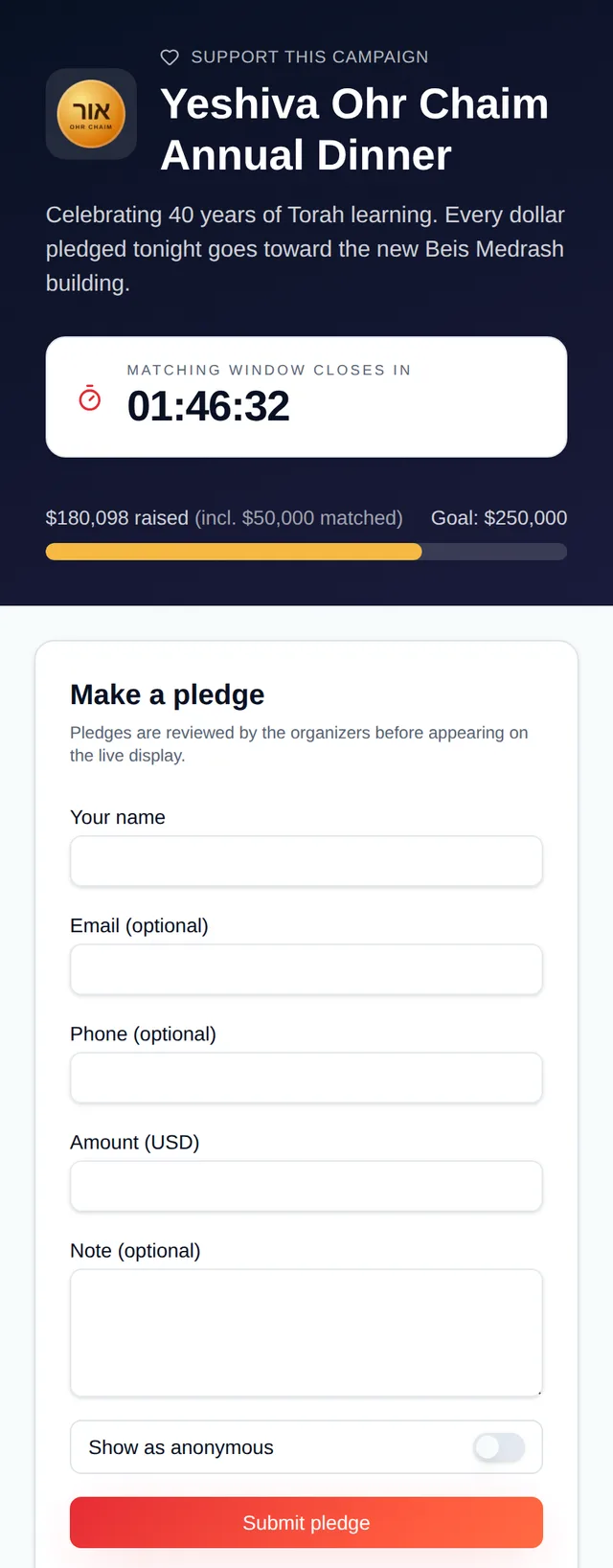
- Branded header with your logo, event name, description, the running total against the goal and — if you enable it — the countdown.
- A short form: name, optional email and phone, amount, an optional note, and a “show as anonymous” switch.
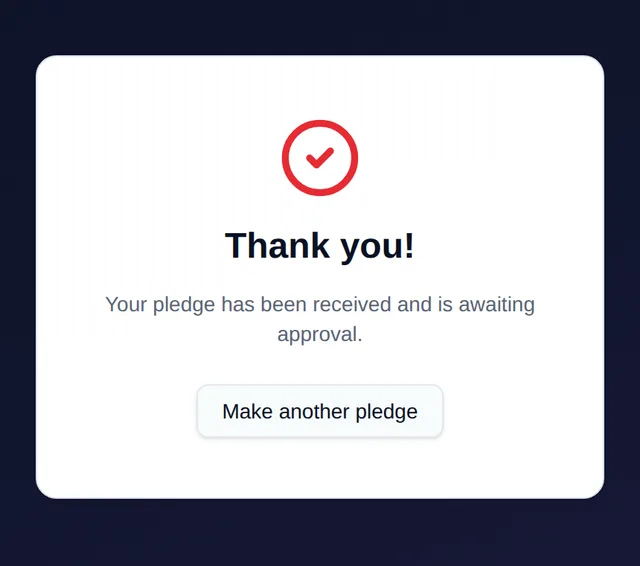
- Every submission lands in the approval queue on the dashboard; the guest sees a thank-you screen that explains it is awaiting approval.
- Sponsor credits at the bottom of the page, grouped by tier, so sponsors get billing on the phone as well as on the wall.
- Copy the link from the dashboard with one click; the page is mobile-first and needs no app.
Record it now. Reveal it when the room is ready.
Some gifts should not appear the moment they are entered: the matching donor's pledge that opens the second half, the surprise dedication after the keynote, the board's gift saved for the finale. Enter them ahead of time, choose when they go live, and let the screen do the rest.
- A “Display time” field on the entry form with one-tap presets from +5 minutes to +1 day, or a specific clock time.
- Until that moment the pledge is hidden from the live screen, the public total and the pledge page — the dashboard still shows it with a “Scheduled” badge.
- When the time arrives it appears with the full takeover and celebration effect, exactly like a pledge entered live.
- Change or clear the time from the pledge table at any point; a pledge whose time has passed simply stays on the board.
- Built for matching campaigns: hold the matcher's gift, announce the match, then let it land on screen on cue.
- Included on the free trial and the unlimited tier.
Run a matching campaign without a spreadsheet.
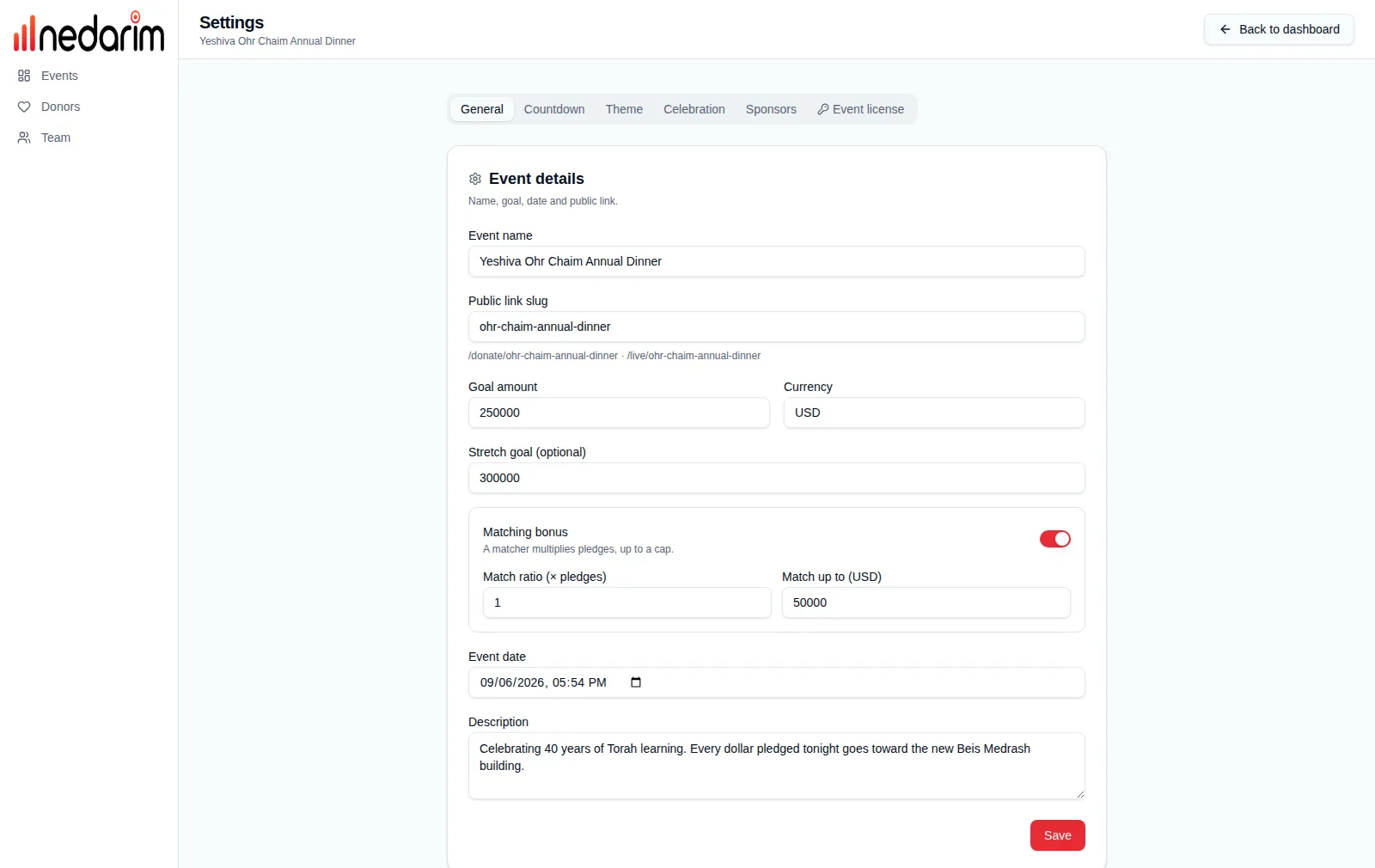
Turn on the matching bonus and every pledge is multiplied by your matcher's ratio, up to the cap they agreed to. The live screen, the dashboard and the pledge page all show the total including the match, and how much of it came from the matcher.
- Match ratio × pledges (1 for a dollar-for-dollar match, 2 for a double match) and a “match up to” cap — the matcher never gives more than they promised.
- The raised figure everywhere is pledged plus matched, with an “incl. $X matched” line so the room knows the match is working.
- A bonus goal: a milestone above the main goal with a celebration of its own when the total passes it; the percentage keeps climbing against the original goal.
- Pair it with the countdown (“Matching window closes in”) and a scheduled reveal of the matcher's own gift for a proper matching-hour push.
- Set both on the General tab of event settings, or when creating the event; change them mid-event and every screen recalculates.

Give sponsors the billing they paid for.
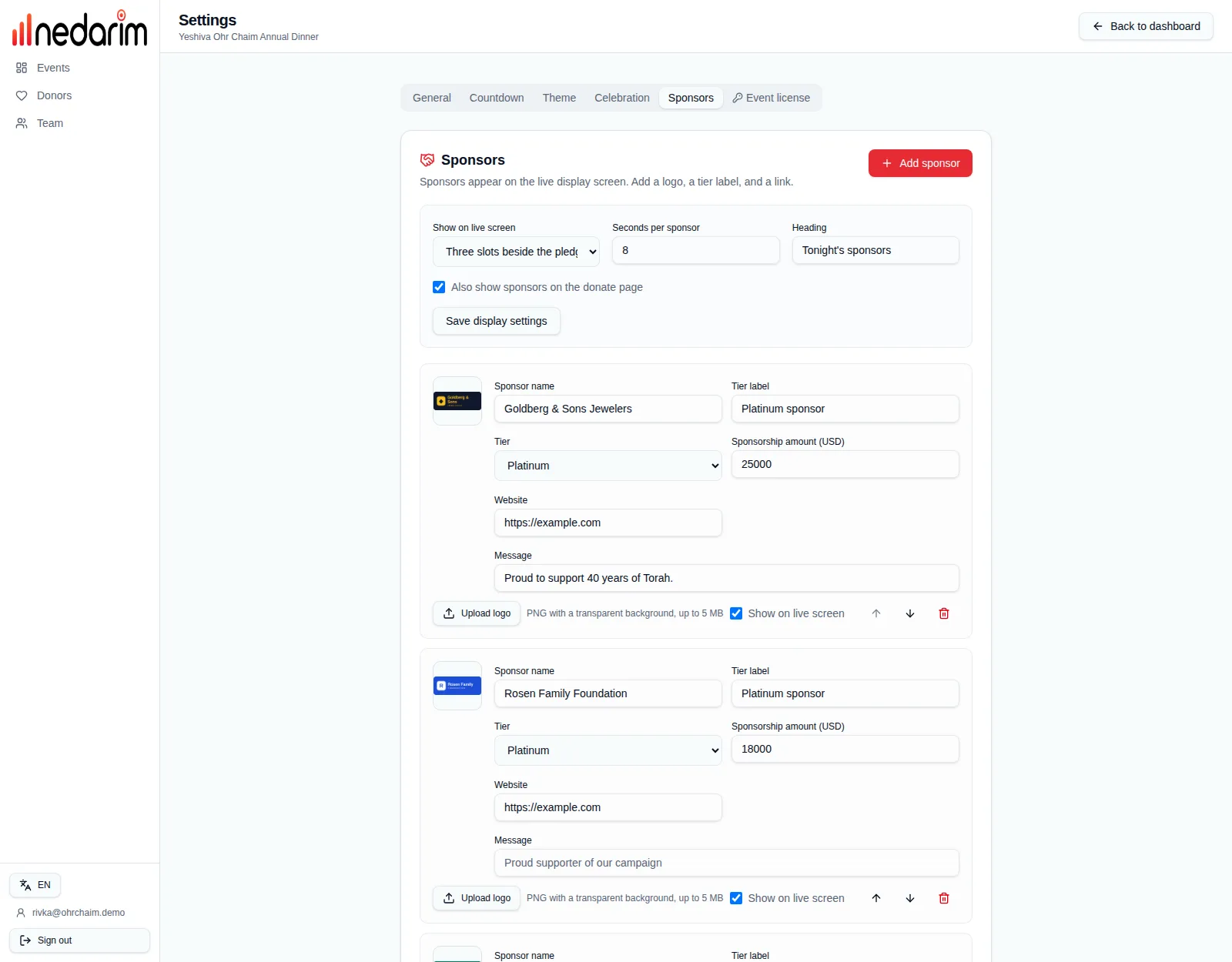
Add your sponsors with a logo, a tier and an optional amount and message. Tiers decide where each sponsor appears, how large the logo is and how long it holds the screen — so a platinum sponsor really does look bigger than a silver one.
- Three display layouts for the live screen: three rotating slots beside the pledges (the default), a rotating spotlight with amount and message, or a logo wall. Or hide them entirely.
- Sponsor tiers (Platinum, Gold, Silver by default — rename or add your own) with placement, spotlight duration and logo size per tier.
- Per-sponsor tier label, website, sponsorship amount and a message that shows in the spotlight.
- Sponsors also appear on the pledge page, grouped by tier with the biggest logos first.
- Reorder with arrows, toggle a sponsor on or off without deleting it, and upload transparent PNG logos up to 5 MB.
- A custom heading, such as “Tonight's sponsors”, on both screens.
Put a clock on the matching window.
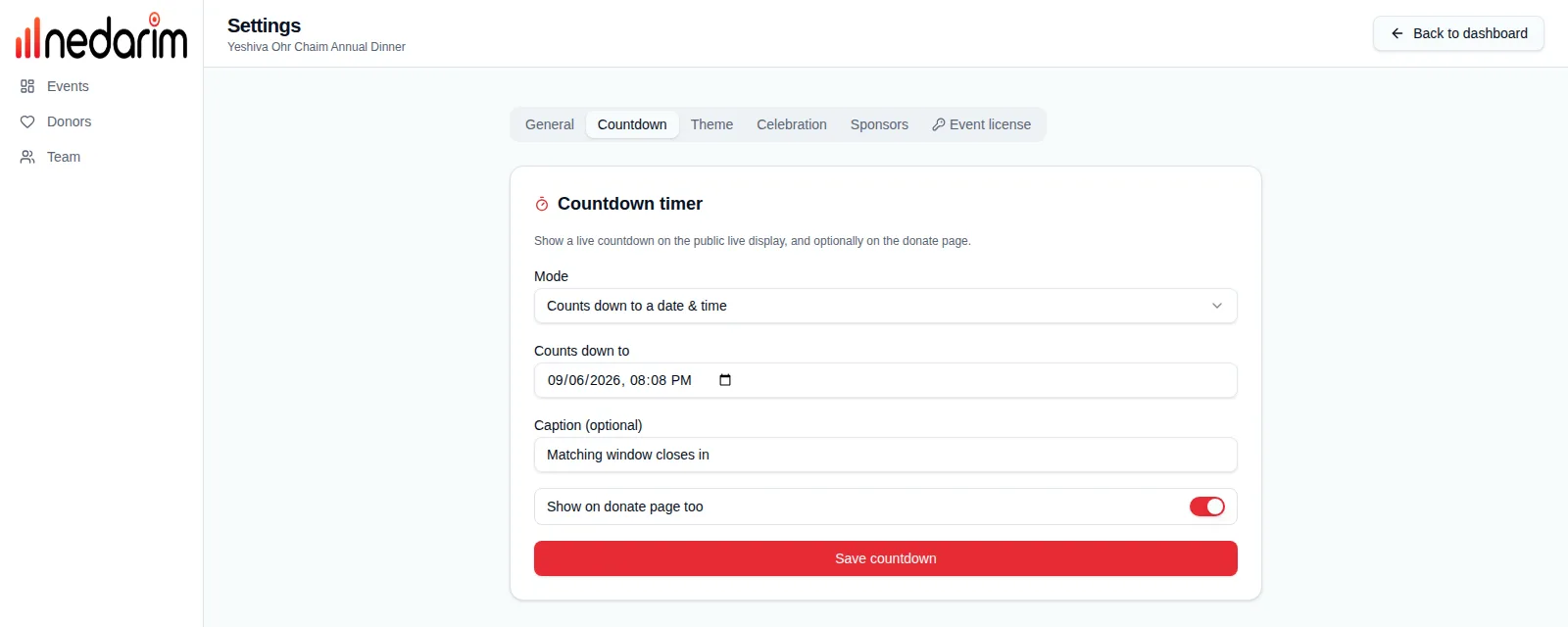
A countdown on the live screen turns a fundraising goal into a deadline. Count down to a fixed time, or run a stopwatch-style timer you start, pause and reset from the dashboard.
- Two modes: count down to a date and time, or a fixed duration with Start, Pause, Resume and Reset controls.
- Your own caption above the digits, for example “Matching window closes in”.
- Shows in the live screen's hero next to the total, on the dashboard for your staff, and optionally on the pledge page.
- Flips to a “time's up” banner when it reaches zero.
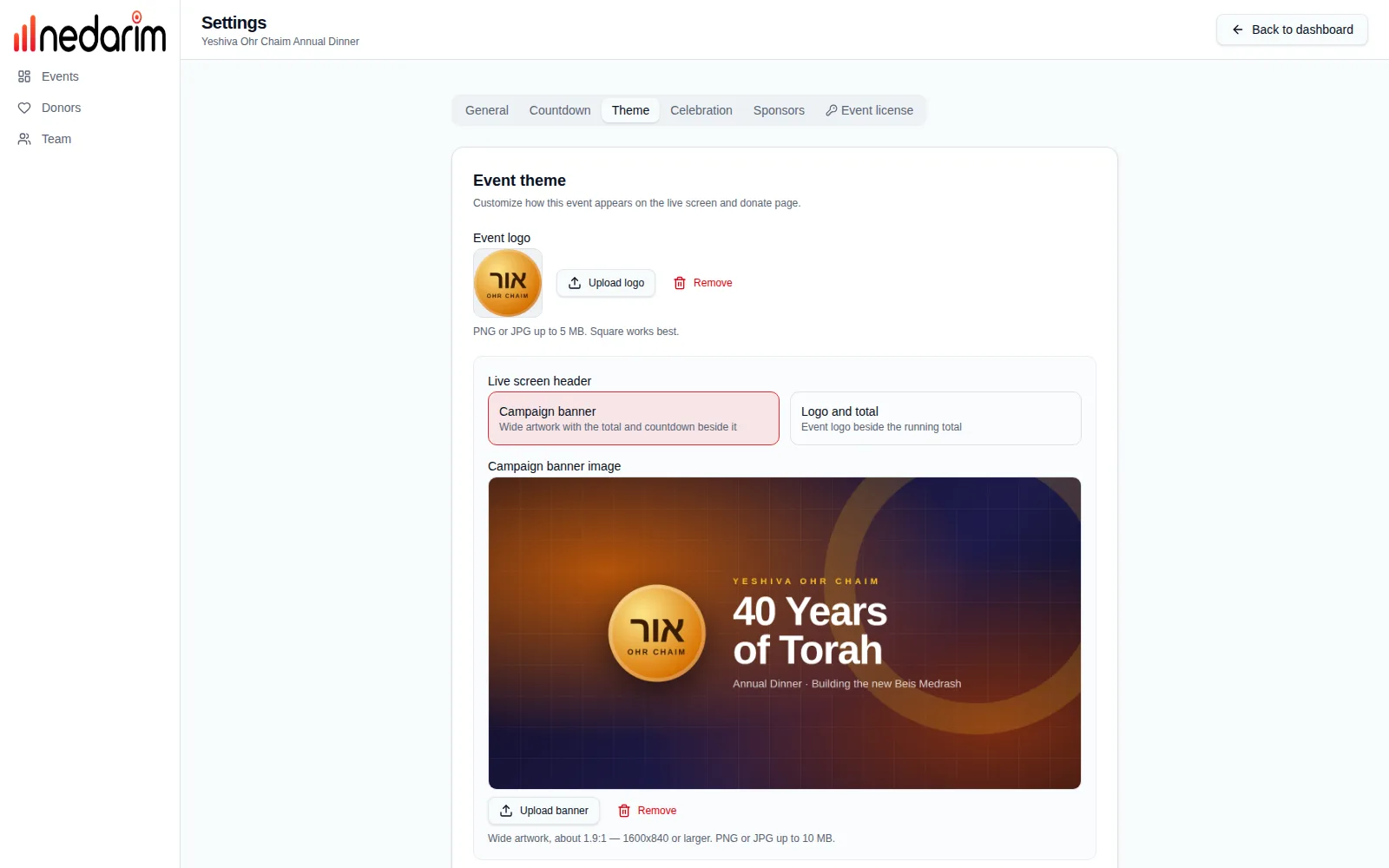
Your logo, your colours, your screen.
Upload the organization's logo and campaign artwork, pick an accent colour and a background, and the live screen, the takeover and the pledge page all follow. Prefer a gradient? Choose two colours, a direction and a style, and let it drift.
- Logo upload (PNG or JPG) shown on the live screen, the pledge page and the dashboard preview.
- Live screen header: a campaign banner (wide artwork up to 10 MB with the total and countdown beside it) or the logo-and-total layout.
- Accent colour drives the total, progress bar, highlights and the takeover amount.
- Flat background colour, or a linear, radial or conic gradient with eight direction presets and an optional slow animation.
- Live preview while you edit; the default animated aurora look needs no configuration at all.
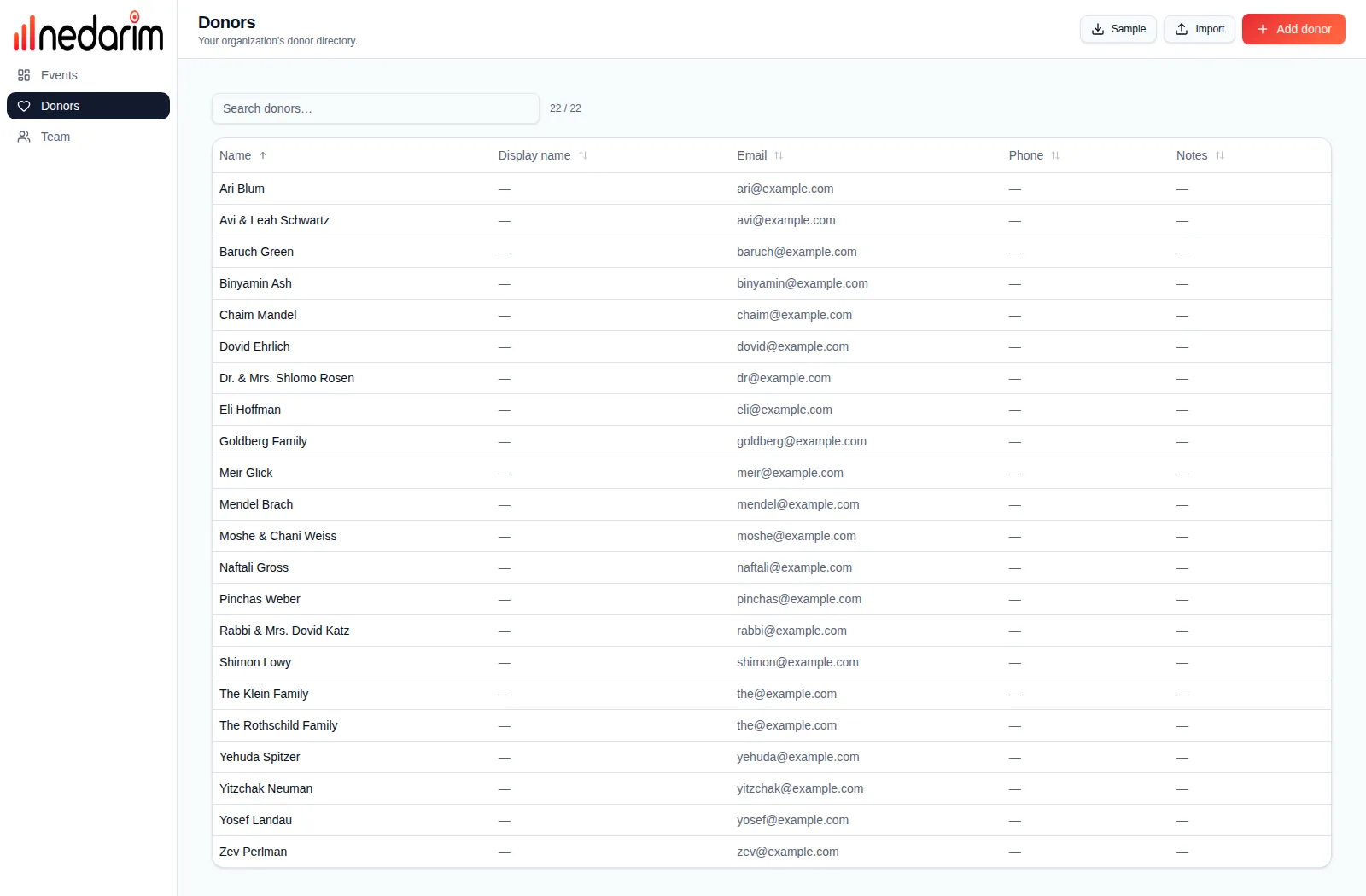
Your donor list stays yours.
Every pledge is linked to a donor record in your organization's directory, so next year's dinner starts with last year's donors. Import a spreadsheet, invite your team, and export everything whenever you want.
- Donor directory with name, display name, email, phone and notes; search, sort and see each donor's pledge history and lifetime giving.
- Import donors from CSV or Excel (a sample file is provided) and export the directory back out.
- Team invites by email with organization-admin and staff roles; invites expire automatically.
- Export an event's pledges to Excel with donor, display name, amount, status, source, note and submitter contact details.
- Download a full JSON archive of an event before deleting it; deletion is confirmed by typing the event name.
- Sign in with a six-digit email code, a password or Google. Self-service data export and account deletion for GDPR.
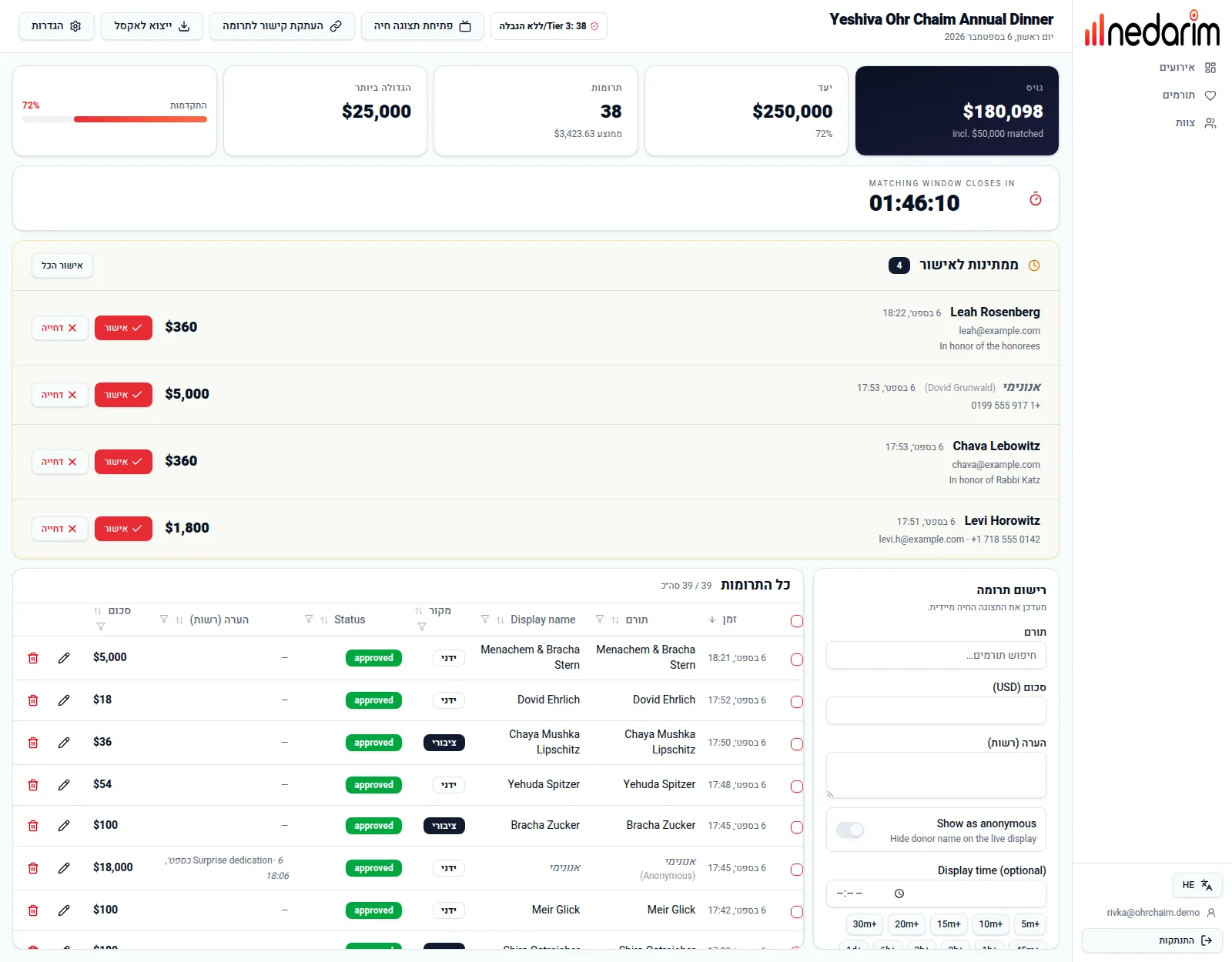
עברית · العربية
The whole organizer app is available in English, Hebrew, Arabic, German, French and Dutch, with a proper right-to-left layout for Hebrew and Arabic — switch languages from the sidebar at any time. Amounts can be in USD, ILS, EUR, GBP, CAD, AUD and more.
- Full translation of the dashboard, settings, donors, team and account pages in all six languages.
- Right-to-left layout with mirrored navigation, tables and forms.
- Ten currencies, formatted correctly on every screen.
- The live display keeps large, language-neutral numbers front and centre.
Built to not fail on the night.
Real-time, not refresh
Every screen listens to a live change stream from the database. A pledge approved on a phone appears on the projector within a second, and a dropped connection heals itself and catches up.
Any screen, any browser
The live display and the pledge page are ordinary web pages. Laptop and HDMI cable, TV browser or streaming stick — if it opens a website, it can show your event.
Phones welcome
The pledge page is designed for a phone first. The dashboard works on a tablet at the door and on the laptop at the head table.
Moderated by design
Nothing from the public link reaches the screen without an organizer's approval. Contact details never leave your dashboard; the public pages only ever receive names and amounts.
Nothing missed
New public pledges raise a notification on the dashboard, scheduled reveals fire on time even if nobody is looking, and totals are always summed from the source of truth.
Cloud or your own server
Use nedarim.com, or self-host the whole thing with Docker and Postgres — one container, one database, and your data stays in your building.
Your data, exportable
Pledges to Excel, donors to CSV, events to JSON, and a one-click export of your own account data.
Per-event licensing
No subscription. Start free with up to 10 pledges, then buy a license sized to the event when you need it. A license moves between events until it is used.